OnSiteLight Use Pattern
OnSiteLight use pattern explains how the product can typically be used in daily operation:
- Midgaard is the site that has acquired OnSiteLight to control lighting at 2 locations...
- Freja is a customer who needs area lighting...
- Thor is a technician, works at Midgaard, and needs light for service tasks...
- Odin is manager at Midgaard and is responsible for the lighting...
The Lighting
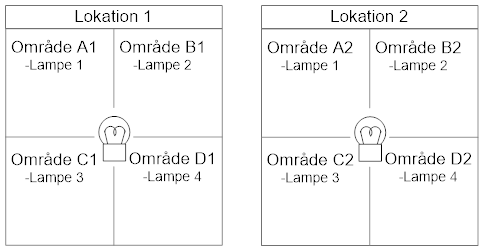
Midgaard uses OnSiteLight at a site divided into two locations with 4 areas each.
- One light mast with 4 lamps and one OnSiteLight panel is placed in the centre of each location
- There is one lamp per area, and each lamp can be switched on and off individually
- There is a reader where cards and tags can be used to operate the light
- There is a phone number that can be called to operate the light
Operating Media
OnSiteLight has different media for operating the lighting:
- Voice: all lamps the user has rights to and that are connected to the OnSiteLight panel can be operated by voice call
- SMS: all lamps the user has rights to and that are connected to the OnSiteLight panel can be operated by SMS *
- aKey: all lamps the user has rights to and that are connected to the OnSiteLight panel can be operated at the panel with tags and cards *
- App: all lamps the user has rights to can be operated *
- Web: all lamps the user has rights to can be operated, and the administrator can operate all lamps
Basic Lighting
Odin has decided that Midgaard must always have basic lighting and has therefore configured OnSiteLight to:
- Keep the light off during daytime
- Always allow manual light operation
- Use basic lighting at 25% of full intensity from Monday to Friday when it becomes dark
- Use basic lighting at only 15% of full intensity from Saturday to Sunday when it becomes dark because there is limited activity at Midgaard during weekends
Prerequisites
Freja must be created as a customer at Midgaard:
- Freja contacts Midgaard to be created as a customer
- Midgaard creates Freja in a few minutes...
- Midgaard gives Freja rights to areas A1+B1+C1+D1+A2+C2
- Freja can now use, for example, her phone or an RFID card for operation
- Freja downloads and installs the app for operating OnSiteLight *
Thor has already been created as a technician and has rights to all areas.
Odin has already been created as an administrator and also has rights to all areas.
How Odin Turns On The Light
Odin is in the office and can control the light at Midgaard:
- As administrator, Odin can use all media, for example voice call or RFID card, and turn on the light in all areas
- Odin can also turn on the light in all areas from the office with Emiko
- With Emiko, Odin can turn on one area, some areas, or all areas
- Odin can turn on areas and select the customer that the electricity consumption must be registered to, for example:
- Freja contacts Odin and wants the light turned on in areas A1 and B1
- Odin selects Freja from the customer directory and turns on the areas
- All electricity consumption for A1 and B1 is registered to Freja
- To turn off the light, Freja contacts Odin again, and Odin turns off the areas
- When Odin turns off the light, OnSiteLight sends an SMS to Freja confirming the consumption, which is invoiced later
How Thor Turns On The Light
Thor is performing service tasks, and it is dark at the locations:
- As technician, Thor can use all media, for example voice call or RFID card, and turn on the light in one or more areas
- All electricity consumption is registered to Thor and is registered as Midgaard's internal electricity consumption for service tasks
- When Thor turns off the light, OnSiteLight sends an SMS to Thor confirming the consumption
How Freja Turns On The Light In Area A1 By Voice
Freja needs lighting in area A1:
- Freja presses the button for area A1
- The lamp flashes to indicate that area A1 is selected
- Freja calls the phone number on OnSiteLight
- OnSiteLight approves Freja and turns on the light...
- All electricity consumption is registered to Freja
- When Freja turns off the light, OnSiteLight sends an SMS to Freja confirming the consumption, which is invoiced later
How Freja Turns On The Light In Area A1 By SMS
Freja needs lighting in area A1:
- Freja presses the button for area A1
- The lamp flashes to indicate that area A1 is selected
- Freja sends an SMS to the phone number on OnSiteLight
- OnSiteLight approves Freja and turns on the light...
- All electricity consumption is registered to Freja
- When Freja turns off the light, OnSiteLight sends an SMS to Freja confirming the consumption, which is invoiced later
How Freja Turns On The Light In Area A1 By aKey
Freja needs lighting in area A1:
- Freja presses the button for area A1
- The lamp flashes to indicate that area A1 is selected
- Freja holds an RFID card or a tag over the aKey tag reader on OnSiteLight
- OnSiteLight approves Freja and turns on the light...
- All electricity consumption is registered to Freja
- When Freja turns off the light, OnSiteLight sends an SMS to Freja confirming the consumption, which is invoiced later
How Freja Turns On The Light In Areas A1 And B1
Freja needs lighting in areas A1 and B1:
- Freja presses the buttons for area A1 and area B1
- The lamps flash to indicate that areas A1 and B1 are selected
- Freja calls the phone number, sends an SMS, or uses a tag on OnSiteLight
- OnSiteLight approves Freja and turns on the light in both areas...
- All electricity consumption is registered to Freja
- When Freja turns off the light, OnSiteLight sends an SMS to Freja confirming the consumption, which is invoiced later
How Freja Turns On The Light In Areas B1, D1, A2 And C2
Freja needs lighting in areas B1, D1, A2 and C2:
- Freja opens the app and selects the 4 areas, with 2 areas at each location
- Freja presses the on button in the app
- OnSiteLight approves Freja and turns on the light...
- The app now shows that the 4 areas are on
- All electricity consumption is registered to Freja
- When Freja turns off the light, OnSiteLight sends an SMS to Freja confirming the consumption, which is invoiced later
How Freja Tries To Turn On The Light In Area B2
Freja needs lighting in area B2:
- Freja opens the app and tries to select area B2, but the area is not available
- Freja contacts Midgaard, which gives Freja rights to area B2
- Freja refreshes the page in the app and can now select area B2
- Freja presses the on button in the app
- OnSiteLight approves Freja and turns on the light...
- The app now shows that area B2 is on
- All electricity consumption is registered to Freja
- When Freja turns off the light, OnSiteLight sends an SMS to Freja confirming the consumption, which is invoiced later
How Freja Tries To Turn On The Light In Area D2
Freja needs lighting in area D2:
- Freja presses the button for area D2
- The lamps flash to indicate that area D2 is selected
- Freja calls the phone number, sends an SMS, or uses a tag on OnSiteLight
- OnSiteLight does not approve Freja and does not turn on the light because Midgaard has not granted rights to area D2
- Freja contacts Midgaard, which gives Freja rights to area D2
- Freja can now try again and turn on the light...
- All electricity consumption is registered to Freja
- When Freja turns off the light, OnSiteLight sends an SMS to Freja confirming the consumption, which is invoiced later
How Freja Pays For The Electricity Consumption
- OnSiteLight automatically registers the electricity consumption
- Midgaard retrieves electronic settlement data and sends an invoice to Freja
Do Odin And Thor Have To Pay For Electricity Consumption
- OnSiteLight automatically registers the electricity consumption
- Odin's and Thor's consumption is registered as internal consumption for service tasks
- Midgaard now has a complete overview of the internal electricity consumption
How Freja Can Use A Requisition Number
Freja has been given a requisition number *:
- When Freja turns on the light, Freja can send the requisition number by SMS to OnSiteLight
- OnSiteLight stores the requisition number together with the consumption
- When Freja receives the invoice from Midgaard, the invoice includes the requisition number
Freja completed a lot of good work at Midgaard with good lighting and paid the invoice a few days later...
* Option